Supplied, installed and serviced by Gtech FZE, the authorized Ricoh distributor in Jebel Ali, Dubai.
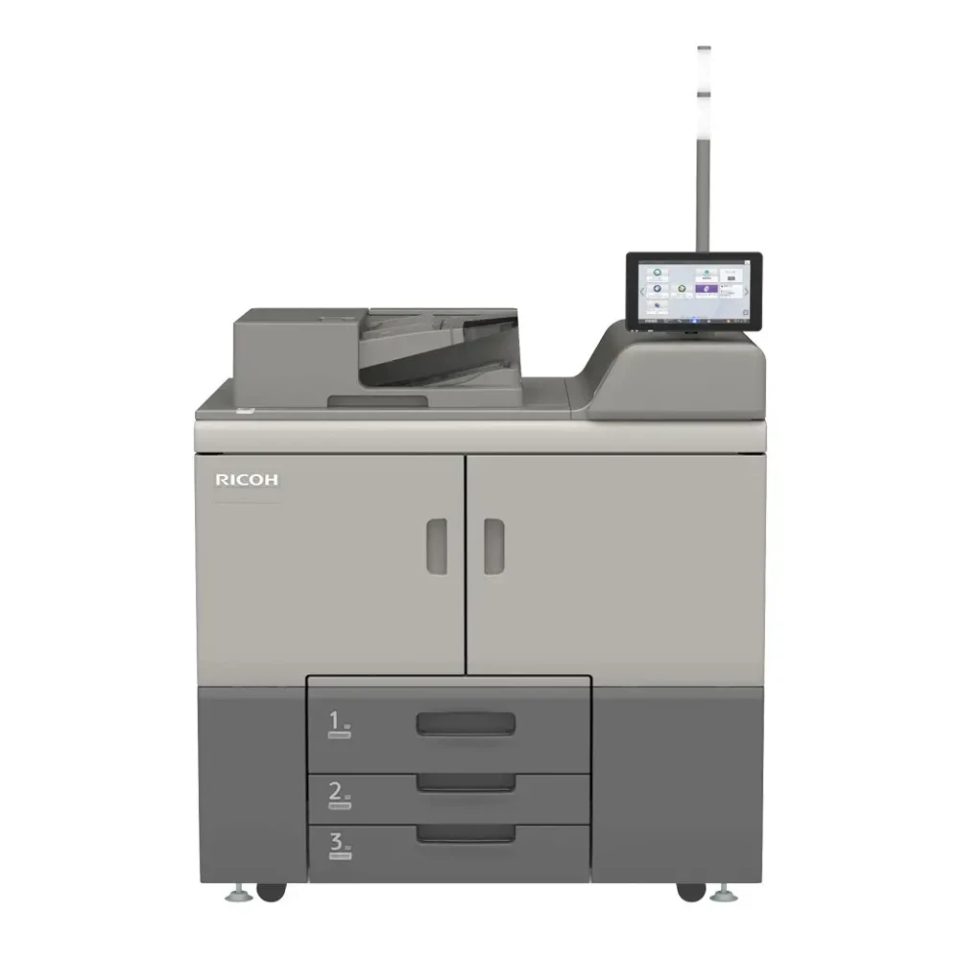
The Pro 8420S runs at 136 ppm, rated to 1,000,000 prints, input capacity up to 16,700 sheets.
| SPECIFICATIONS | |
|---|---|
| Functions | Copy, print, scan |
| Colour | No |
| Printer controller - standard | GWNX |
| Printer controller - optional | Fiery EB-36 controller |
| Storage | 640 GB (320 GB x 2) |
| Document server | Maximum stored documents 3,000 Maximum pages of all stored documents 15,000 Maximum storage period 1-180 days, 1-96 hours, or no limit |
| CPU | Intel ApolloLake E3940 1.6 GHz |
| Memory - standard | 2 GB |
| Operation panel | 10.1" Smart Operation Panel (G3) |
| GENERAL | |
| Physical dimensions (WxDxH)—mainframe | 1,141 x 900 x 1,750 mm |
| Weight—mainframe | 428 kg |
| Minimum space requirements | 100 mm—left 47 mm—rear 100 mm—right 57 mm—front |
| Average monthly volume | 250,000 prints |
| Average monthly statement | 150,000–500,000 prints—recommended document volume |
| Max monthly volume | 1,000,000 prints |
| Machine life | 60,000,000 prints or 5 years, whichever comes first |
| Duty cycle | 4,000,000 prints per month |
| Standard input capacity (sheets) | 3,300 sheets (0.1mm)—2,200-sheet tandem tray + 550-sheet paper tray 2 + 550-sheet paper tray 3 3,000 sheets (0.11mm)—2,000-sheet tandem tray + 500-sheet paper tray 2 + 500-sheet paper tray 3 |
| Maximum input capacity (sheets) | 16,700 |
| Maximum output capacity (sheets) | 15,000 |
| Paper input configuration - standard | 2,200-sheet tandem paper input tray (2 x 1,100 sheets), 2 x 550-sheet paper input trays, 220-sheet SPDF, duplex unit |
| Paper input configuration - optional | LCIT RT5160 (A4), LCIT RT5170 (A3), Vacuum-Feed LCIT RT5150, Multi-Bypass Tray BY5020, Multi-Bypass Banner Sheet Tray Type S9, Vacuum-Feed Banner Sheet Tray Type S9, Bridge Unit BU5010, A3/11" x 17" Tray Unit TK5020 (internal) |
| Paper output configuration - optional | Booklet Finisher SR5120, Finisher SR5110, Punch Unit PU5030, Trimmer Unit TR5050 for Booklet Finisher SR5120, Cover Interposer CI5040, SR5000 Series Output Tray For Banner Sheet Type S6, Decurl Unit DU5070, High-Capacity Stacker SK5040, Multi-Folding Unit FD5020, Multi-Folding Unit FD5030, Bridge Unit BU5020 (for third party finishers) |
| Paper output configuration - 3rd Party | Plockmatic PBM 350e, Plockmatic Rotate Crease Trim (RCT) e, Plockmatic SBT (Square Back Trimmer), Plockmatic CT XL, Plockmatic HCI3500 High-Capacity Interposer,GBC StreamPunch Plus 220V RICOH, GBC StreamWire |
| Maximum paper size | 330.2 x 700 mm |
| Media weight (g/m2) | 40–350 |
| Limitless paper supply | Supported |
| Interfaces - optional | Mainframe IEEE 802.11 a/b/g/n/ac Interface Unit Type M52 Fiery EB-36 controller Not available |
| Network protocols - standard | GWNX controller TCP/IP (IPv4, IPv6) Fiery EB-36 controller TCP/IP (IPv4, IPv6) |
| Copy speed | 136 cpm |
| First copy time | 4.6 seconds or less |
| Copy resolution | 2,400 x 4,800 dpi—printing 600 x 600 dpi—scanning |
| Original size | Maximum 297 x 432 mm 297 x 431.8 mm—SPDF |
| Quantity selection | 1–9,999 |
| Job presets | Up to 10 presets |
| Job programs | Up to 50 jobs |
| Zoom range | 25%–400%, in 1% steps |
| Image density adjustment | Supported—9 levels |
| Image density adjustment | 9 levels |
| Copy modes | Text, Photo, Text/Photo, Generation Copy, Pale |
| Colour mode | Greyscale—256 levels |
| Book copy | Supported |
| Series copy | Book to simplex, duplex to simplex |
| Combine copy | 2, 4, or 8 pages into 1 simplex sheet 1, 2, or 4 duplex pages into 1 simplex sheet 4, 8, or 16 pages into 1 duplex sheet 2, 4, or 8 duplex pages into 1 duplex sheet |
| Auto tray change | Supported |
| Centring | Supported |
| Cover sheet | Front and back covers—copy or blank |
| Slip sheet | Supported |
| Chaptering | Up to 100 chapters |
| Stapling | Supported—with finisher |
| Punch | Supported—with finisher and punch unit |
| Electronic sorting | Without shift sort—supported Rotate sort—not supported Shift sort—supported—with finisher or shift sort tray |
| Margin/erase adjustment | Margin adjustment 0–30mm—in 1 mm steps Default—Front page: 5mm left, Back page:5 mm right Erase centre and border 2–99 mm in 1 mm steps Creep Supported (magazine) Scan position Supported |
| Image adjustment | Sharp/soft—7 levels Contrast—9 levels Background density adjustment—9 levels |
| Image creation | Repeated, Double copy, Positive/negative, Erase inside, Erase outside |
| Stamps | User stamp—5 stamps Date stamp—4 styles Page numbering—6 styles Preset stamp—8 stamps Bates stamping—6 styles Printing copy prevention pattern—supported |
| Print speed black and white | 136 ppm |
| Printing technology | 40-beam Vertical-Cavity Surface-Emitting Laser (VCSEL) |
| Fusing | Oil-less belt-fusing method |
| Print resolution | 2,400 x 4,800 dpi—maximum Note: Engine print resolution is 1,200 x 4,800 dpi. |
| Print margin | Lead edge 4.0 ± 0.5 mm Trail edge 4.0 ± 1.0 mm (Print) Front 2.0 ± 1.5 mm Rear 2.0 ± 1.5 mm |
| Page description languages (PDLs) | Standard PCL, PostScript 3 and PDF emulation, JPEG, TIFF Optional Genuine Adobe PostScript 3 and PDF, Intelligent Printer Data Stream (IPDS), XPS |
| Printer driver resolution | PCL 5 300 x 300 dpi, 600 x 600 dpi—1-bit PCL 6 600 x 600 dpi, 1,200 x 1,200 dpi—1-bit PostScript 3 300 x 300 dpi, 600 x 600 dpi, 1,200 x 1,200 dpi—1-bit IPDS 300 x 300 dpi, 600 x 600 dpi—1-bit |
| Duplex printing | Standard |
| Envelope printing | Supported—Bypass Tray BY5020, LCIT RT5170, Vacuum-Feed LCIT RT5150 |
| Maximum printable area | Simplex, edge-to-edge print mode 320 x 457.2 mm—mainframe tray 2 320 x 487.7 mm—with A3 LCIT and bypass tray options Note: Image quality in areas that interfere with the print margins is not guaranteed. |
| Scan speed | 140 ipm—simplex 280 ipm—duplex |
| Scan methods | Scan to USB/SD, Scan to email, Scan to folder (SMB, FTP) Scan to URL, Scan to PDF/A, Scan to digitally signed PDF, Scan to searchable PDF (embedded) Note: Maximum scan size for 1,200 dpi is A5. |
| Scan mode | Black and white Text, text/line art, text/photo, photo, greyscale Colour Text/photo, glossy photo, Automatic Colour Selection |
| Scan area | Main scan 297 mm Sub-scan 432 mm 431.8 mm—from SPDF |
| Scanner compression methods | Black and white JBIG2, MH, MMR, MR Colour JPEG |
| Scanned file naming | Supported—with reference number setting, for example, SCAN0001 |
| Image density adjustment | Supported—9 levels |
| Scan to file types | Single- and multi-page TIFF Single-page JPEG Single- and multi-page PDF Single-page high-compression PDF |
| Scan to folder | Protocols SMB, FTP Resolution 100 dpi, 150 dpi, 200 dpi (default), 300 dpi, 400 dpi, 600 dpi Search for client folders SMB—browsing directly to the designated folder Scan to folder file types Single-page TIFF, JPEG, PDF, PDF/A, high-compression PDF Multi-page TIFF, PDF, PDF/A, high-compression PDF |
| Other scan features | SADF/batch mode, Mixed size mode, Reduce/enlarge scanning, Split scan from booklet, WS scanner, LDAP support (email), Preview before transmission, PDF encryption, Drop-out colour send, Distributed Scan Management |
| Standard | Device management and monitoring @Remote Web Image Monitor Device Manager NX Lite Workflow solutions Streamline NX TotalFlow Production Manager TotalFlow Prep RICOH InfoPrint Manager BatchBuilder RICOH Process Director RICOH Supervisor FusionPro VDP Creator |
| Power source | 220–240 V, 50/60 Hz, 16 Amps—mainframe 100–240 V, 50/60 Hz, 1–1.5 Amps—Fiery controller |
| Power consumption | 3,520 W—maximum 0.94 W—Energy Saver Mode (Sleep Mode) |
| Typical Electricity Consumption (TEC) | 17.2 kWh |
| Warm-up time | 300 seconds or less—at temperature of 23°C |
| Sound power level | Mainframe 60.4 dB or less—standby 73.7 dB or less—printing Full system 78.8 dB or less—printing |
| Emission levels | 0.02 mg/h or less—benzene 1.5 mg/h or less—dust 0.48 mg/h or less—ozone 0.10 mg/h or less—styrene |
| Total Volatile Organic Compounds (TVOC) | 4.18 mg/h—printing 0.0092 mg/h—standby |
| Safety standards | EN62368-1 IEC60950-1 |
| Electromagnetic Compatibility (EMC) standards | EN62311 EN55032 EN55035 EN61000-3-2, EN61000-3-3 AS/NZS CISPR32 |
| Wireless LAN standards | EN301489-1 EN301489-3 EN301489-17 AS/NZS 4268 |
Specifications and images are provided for general reference only and may vary by configuration, revision or region. They do not form part of any offer or contract. Contact us to confirm exact specifications, availability and pricing for your requirement.
Tell us your monthly volume and we will quote the right configuration, delivered and installed anywhere in the UAE.