
RICOH M 2310N
Supplied, installed and serviced by Gtech FZE, the authorized Ricoh distributor in Jebel Ali, Dubai. Delivered across Abu Dhabi, Sharjah and every emirate, and exported throughout the Middle East and Africa.
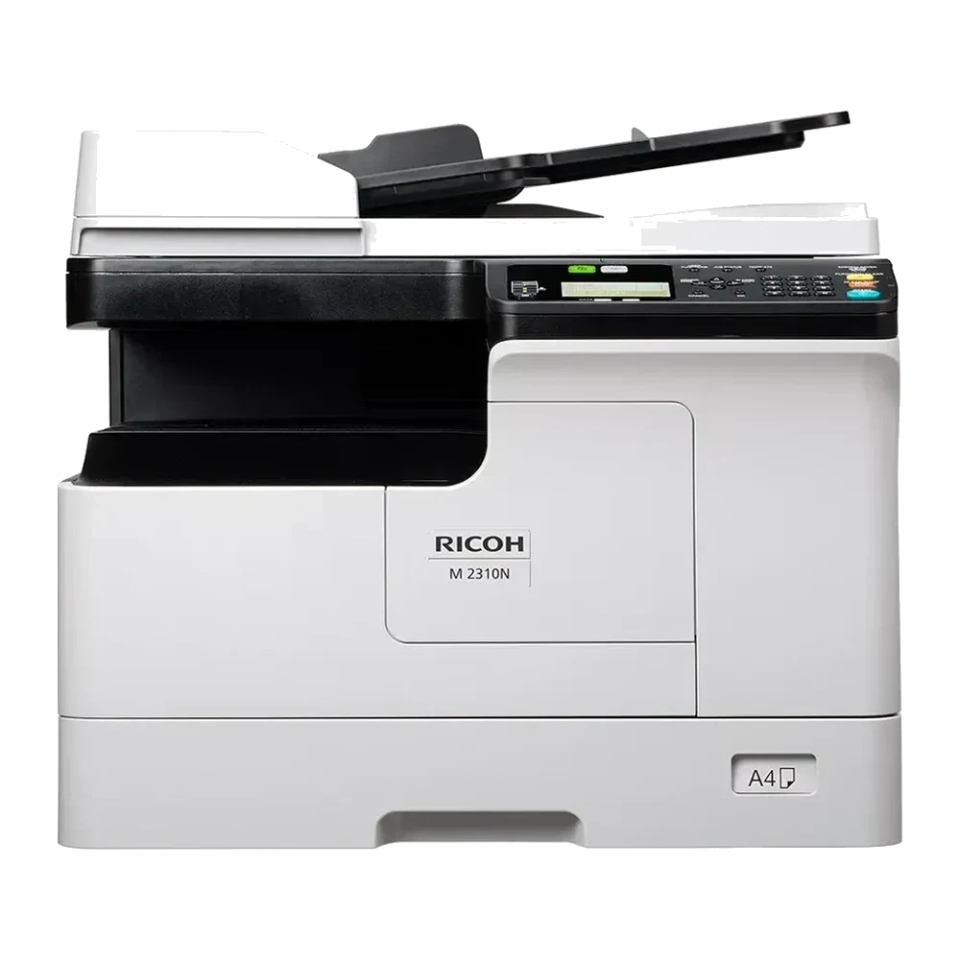
 Genuine Ricoh hardwareSupplied and serviced by an authorized distributor, with full manufacturer warranty.
- Copy, print, scan
- Prints up to 23 ppm
- 6.4-second first copy time
- Optional platen or ARDF
Highlights
The M 2310N runs at 23 ppm, A4 14 ppm, A3.
- Output speed: 23 ppm, A4 14 ppm, A3
- Print resolution: 2,400 x 600 dpi, with smoothing process
- Scanning speed: A4, black and white 25 ipm, 200 dpi, 300 dpi A4, colour 24 ipm, 150 dpi, 200 dpi
- Memory: 512 MB
- Paper size: A3
Product specifications
| SPECIFICATIONS | |
|---|---|
| Functions | Copy, print, scan |
| Colour | No |
| Storage | Not available |
| Memory - standard | 512 MB |
| Operation panel | 4-line LCD |
| GENERAL | |
| Physical dimensions (WxDxH), mainframe | 575 x 565 x 402 mm, without platen cover or ARDF |
| Weight, mainframe | 24.4 kg |
| GENERAL | |
| Standard input capacity (sheets) | 350 |
| Maximum input capacity (sheets) | 600 |
| Standard output capacity (sheets) | 100 |
| Paper input configuration - standard | 250-sheet standard input tray, 100-sheet bypass tray |
| Paper output configuration - standard | 100-sheet output tray |
| Supported media | Standard paper input tray Plain paper Bypass tray Plain paper, Thick paper, Thin paper, OHP film, Label paper, Envelope (52-216 g/m 2 ) Note: Only 64-80g/m 2 paper is supported when printing duplex or multiple originals continuously. Optional paper feed unit Plain paper |
| Maximum paper size | A3 |
| Media weight (g/m2) | 52-216 |
| GENERAL | |
| Interfaces - standard | 10Base-T/100Base-Tx (Ethernet) High Speed USB 2.0 |
| Network protocols - standard | TCP/IP (IPv4, IPv6) |
| GENERAL | |
| Copy speed | 23 cpm |
| First copy time | 6.4 seconds |
| Copy resolution | Scanning 150 x 150 dpi, black and white 200 x 200 dpi, greyscale, colour Printing 2,400 x 600 dpi |
| Zoom range | 25%, 400% in 1% steps, platen; 25%, 200% in 1% steps, ARDF |
| Book copy | Supported |
| ID card copy | Supported |
| GENERAL | |
| Print speed black and white | 23 ppm, A4 14 ppm, A3 |
| First print time | 6.4 seconds |
| Print resolution | 2,400 x 600 dpi, with smoothing process |
| Page description languages (PDLs) | GDI |
| Printer drivers | GDI |
| Duplex printing | Standard |
| Mobile printing | RICOH M 2310 Mobile Print & Scan app |
| Print from USB/SD | Supported |
| GENERAL | |
| Scan speed | A4, black and white 25 ipm, 200 dpi, 300 dpi A4, colour 24 ipm, 150 dpi, 200 dpi |
| Scan methods | Scan to USB, Scan to Mobile, Scan to folder (SMB) |
| Colour scanning | Standard |
| Scan resolution | Black and white 150, 200, 300, 400, 600 dpi Greyscale, colour 150, 200, 300, 400, 600 dpi Note: 400 dpi available only with A4 or smaller size. 600 dpi available only with A5-R size. |
| Scan to file types | PDF, JPEG, TIFF |
| Scan to folder | Protocols SMB Resolution 150 dpi (default), 200 dpi, 300 dpi, 400 dpi, 600 dpi Note: 600 dpi colour scanning is only supported with A5-R. 400 dpi colour scanning is only supported with sizes smaller than A4. Scan to folder file types Single page TIFF, PDF, JPEG Multi-page TIFF, PDF |
| TWAIN scanning | Scan resolution 150 dpi (default), 200 dpi, 300 dpi, 400 dpi, 600 dpi Note: 600 dpi colour scanning is only supported with A5-R. 400 dpi colour scanning is only supported with sizes smaller than A4. Scan mode Full colour, greyscale, black and white |
| GENERAL | |
| Windows | Windows 10 Windows 11 Windows Server 2016 Windows Server 2019 Windows Server 2022 |
| GENERAL | |
| Standard | Web Image Monitor |
| Mobile apps | RICOH M 2310 Mobile Print & Scan |
| GENERAL | |
| Power source | 220-240 V, 50/60 Hz |
| Power consumption | 1,500 W or less, maximum operating 722 W, operating 83.51 W, Ready Mode 6.86 W, Low Power Mode 0.94 W, Energy Saver Mode (Sleep Mode) |
| Typical Electricity Consumption (TEC) | 0.35 kWh |
| Warm-up time | 15 seconds |
| Recovery time | 14.5 seconds |
Specifications and images are provided for general reference only and may vary by configuration, revision or region. They do not form part of any offer or contract. Contact us to confirm exact specifications, availability and pricing for your requirement.
Configure the RICOH M 2310N
Choose paper trays, finishers, fax and security options. Ricoh's compatibility rules are applied as you go, so incompatible options are blocked and required parts are added for you. Send the result to us and we will confirm availability and price.
Standard on the M 2310N
- 250-sheet standard input tray
- 100-sheet bypass tray
- 100-sheet output tray
- 512 MB RAM
- 4-line LCD panel
- Ethernet network connectivity
Paper feeding and input options3 options
Weight: 1.4 kg
Capacity: 50 sheets—80 g/m2 paper, less than 9.5 mm
Dimensions (W x D x H): 570 x 445 x 88 mm
Weight: 4.5 kg
Power consumption: 40 W or less
Capacity: 250 sheets
Paper size: A5R–A3
Paper weight: 64–80 g/m2
Dimensions (W x D x H): 575 x 565 x 117.3 mm
Weight: 5.5 kg
Power consumption: 0.92 W
Options and compatibility rules are Ricoh's, from Ricoh's own configurator. Availability can differ in the Middle East, so we confirm every configuration before quoting.
Want pricing on the RICOH M 2310N?
Tell us your monthly volume and we will quote the right configuration, delivered and installed anywhere in the UAE.