Your copier stores more than you think: MFP data security for UAE offices
5 min read
A modern multifunction printer (MFP) is a networked computer with a scanner and a print engine attached. It has its own storage, its own operating system and a connection to your network and email. That makes it useful, and it also means it holds business information that deserves the same care as a laptop. This guide explains what an MFP stores, the protections to ask for and what to do when a machine leaves your office.
The short version: turn on user authentication, use secure (held) printing for confidential documents, keep firmware up to date, and before any machine is returned, replaced or sold, have its stored data erased and get that confirmed in writing.
What an MFP can store
Ricoh's own security overview lists the data on an MFP's drive that its encryption protects:
the address book (names, email addresses, folder paths)
user authentication data
stored documents, such as files saved to the machine's document server
temporarily stored documents from print, copy, scan and fax jobs
logs
network interface settings and configuration information
Ricoh calls the temporary job data "latent" data: images left on the drive after a copy, print, scan or fax has finished. On a busy office machine that can include payslips, contracts, passports and medical records.
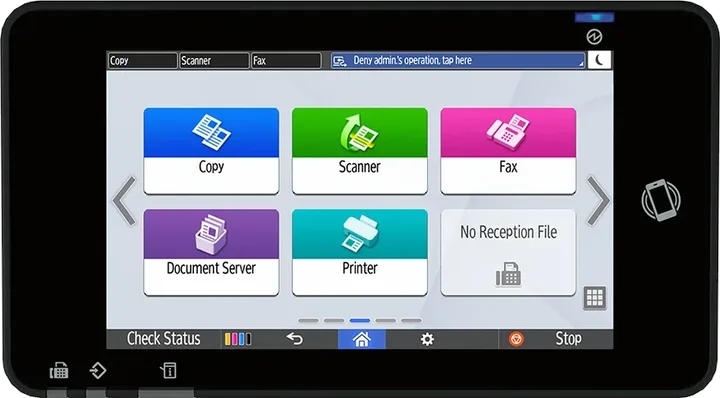
A computer with a touch screen: the Smart Operation Panel on a Ricoh MFP. Functions such as the document server keep files on the machine's own storage.
The protections to ask for
Drive encryption
Ricoh states that it encrypts MFP hard drives with AES at 256 bits, covering the data listed above. If the drive were removed, its contents would not be readable. Whether a feature is standard or an option differs by model (Ricoh lists an Enhanced Security SSD option for the IM C3010, for example), so confirm it for the model you are buying.
Overwriting temporary data
Ricoh's DataOverwriteSecurity System overwrites the temporary data from each job with random data, so images do not stay on the drive. Ricoh says the overwrite can be set to run from 1 to 9 times, and the panel shows when it has finished.
End-of-life erase
Before a machine leaves your premises, the whole drive should be wiped. The IM C320F spec sheet, for example, lists an "Erase All Memory" function that overwrites the drive and non-volatile memory at the machine's end of life.
User authentication and access control
Requiring users to log in (by code, network account or ID card) means you can restrict who can scan to email, use colour or reach the address book, and you get a record of who did what. Ricoh's IM C320F sheet lists Windows, LDAP and basic authentication, user codes, quota limits and 802.1X network authentication.
Secure print
With locked or encrypted secure print, a job waits on the machine until the person who sent it logs in at the panel. This stops confidential pages being left on the output tray.
Network encryption
Scans and print jobs travel across your network. Ricoh's IM C320F sheet lists TLS 1.3, SMTP over SSL/TLS and SNMPv3. Ask your IT team to turn off protocols you do not use.
Firmware integrity
Ricoh states that its devices use a Ricoh Trusted Platform Module and digitally signed firmware, and are designed not to start if the firmware has been altered. Keeping firmware current is still important, because updates close security issues found after the machine was made.
Independent certification
Ricoh has obtained Common Criteria (ISO/IEC 15408) certification for a wide range of products. For example, Japan's certification body (IPA, under its JISEC scheme) lists the Ricoh IM C3510, IM C3010, IM C2510 and IM C2010 with the HDD Option Type M52 as certified on 16 November 2023 at EAL2 augmented by ALC_FLR.2, under the IEEE 2600.2 protection profile for hardcopy devices. Its listed security functions include identification and authentication, document access control, network protection, residual data overwrite and fax line separation.
Certification applies to a specific configuration and firmware version. If your organisation requires certified equipment, ask for the certificate that matches the exact model and options you are buying.
When a machine leaves your office
Copiers move on more often than computers: at the end of a lease, during an upgrade, or when switching supplier. Before any machine leaves:
Run the end-of-life erase, or ask your service provider to do it, and get written confirmation with the machine's serial number.
Delete the address book and stored documents if they are not covered by the erase.
Remove the machine from your network: disable its user accounts, scan-to-folder credentials and email relay permissions.
Record it. Keep the confirmation with your asset register.
The UAE's federal personal data protection law is Federal Decree-Law No. 45 of 2021. Some free zones, such as DIFC and ADGM, have their own data protection laws, and some sectors have their own rules. Which rules apply to your business, and what they require, is a question for your legal adviser. What this guide covers is the practical part: knowing what your printers hold and making sure it is protected and erased.
How Gtech helps
Authorized Ricoh distributor in the UAE, supplying machines through Ricoh's official channel.
In-house engineers for installation and service across the Emirates.
Tell us your security requirements when you ask for a quote, and we will confirm which Ricoh options meet them for the model you choose.
Feature descriptions are from Ricoh's published materials and the JISEC register above, checked on 27 October 2026. Security features, standard equipment and certification differ by model, region, options and firmware version, so confirm them for your exact configuration. This article is general information, not legal advice; take advice from a qualified adviser on your obligations under UAE law or any free zone or sector rules.
Questions
Frequently asked
Do office copiers store copies of documents?
Many do. A multifunction printer can hold temporary job data, stored documents, the address book, logs and settings on its hard drive or SSD. Encryption and overwrite features protect that data.
How do I wipe a copier before returning it?
Run the machine's end-of-life erase function (on Ricoh machines such as the IM C320F, "Erase All Memory"), or ask your service provider to do it, and get written confirmation with the serial number.
Does Ricoh encrypt the copier hard drive?
Ricoh states that it provides hard drive encryption using AES at 256 bits. Whether it is standard or optional differs by model, so confirm it for yours.
What is secure print?
Secure (locked) print holds a job on the machine until the person who sent it logs in at the panel, so confidential pages are not left on the output tray.
Talk to us
Want this applied to your own setup?
We are an authorized Ricoh distributor holding stock at Jebel Ali, supporting installations across the UAE and exporting into the wider region. Tell us your volumes and we will tell you what fits.
UAE offices are about to have machine-readable invoices sitting alongside delivery notes in a lever-arch file. That mismatch is the actual problem, and it is not solved by better accounting software.
Contract end dates, the data on the old machine's drive, scan-to-email settings, user codes and toner stock. What to sort out before you replace your office copiers, whatever brand they are.
Paper sizes, monthly volume, paper capacity, finishing, scanning and running cost. What really separates an A4 office printer from an A3 copier, with Ricoh's published figures for the IM C320F and IM C3010.

 Authorized